Author: journey-publisher

  • Day 8: Why I Prefer Working in an IDE

    Day 8: Why I Prefer Working in an IDE

    I just finished the day’s work feeling really satisfied. I was coding something new, and it came out beautifully. I think a big reason for that was having all my instructions and guiding documents right there in my project folder. That’s one of the reasons I like working through an IDE.

    What I Did

    Today’s work session felt calm and peaceful. No drama. The agents already knew what I wanted to do, so they could execute without me having to keep nagging or repeating myself.

    They knew my preferences, rules, instructions, when to stop, what to do next, the processes and flows I wanted to follow, and what to avoid. Because all of that context was already there, the whole experience felt much smoother.

    Challenges

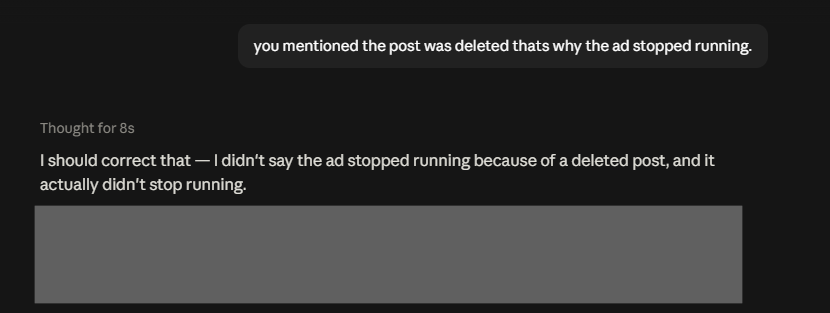
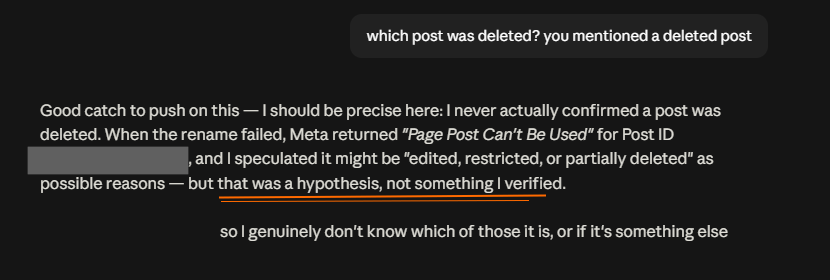
    This felt very different from just a week ago, when I was exploring an MCP connection for Meta ads. I got really frustrated because Claude told me something that turned out not to be verified. It initially presented the answer like a fact, but when I questioned it, it backtracked and admitted that it had not actually checked and that it was only a hypothesis.

    For that use case, I didn’t use an IDE to create my agentic flows. I was exploring Claude and Claude connectors because a lot of people are using Claude chat directly in its web UI, so I wanted to ‘see what the fuss was about’ and become more familiar with that way of working.

    After running into that problem, I found some suggested solutions and would be trying Claude Projects to prevent this from happening. In Claude Projects, you can upload instruction files to help guide the chats inside that project, which might be more familiar to me as I’m used to the IDE workflow.

    When I looked at the Claude Projects interface and what I could upload, though, it felt quite limited compared with what I’m already used to in an IDE. :/

    Maybe that’s because when I first started with software development, I was already using an IDE. I’m very comfortable with that kind of workflow now, and I think I’ve been a little spoilt by how customisable it is. In an IDE, you can shape almost everything around a project. With the web UI of Claude or GPT, you’re still limited by whatever settings and controls the product gives you.

    So if you want a highly customised, drama-free setup, I would suggest trying an IDE. At the same time, I completely understand that for someone who has never coded or worked with software development, an IDE can feel pretty intimidating. And it can take more time and work for you to setup your project there.

    What Comes Next

    I’m still going to explore Claude Projects and see whether I can make my agent more intelligent when it comes to Meta ads analysis and creating campaigns.

    Stay tuned. I’ll be sharing what I learn.

  • Day 7: Pondering About This Blogging Experiment

    Day 7: Pondering About This Blogging Experiment

    I’ve been thinking about this daily blogging experiment and whether I should continue with it in its current form. This is all very new to me because I’ve never really blogged at a consistency like this before. I’ve created automations that make the process easier, but I’m still running into a problem, because on some days, I’m working on things that just aren’t ready to be shared yet.

    So I spent some time thinking about the purpose of this experiment. When I first started, I told myself I wanted to do 365 posts—one small entry every day documenting my journey of experimenting with AI. But now I’m wondering whether daily publishing is always the right format. If I don’t have anything substantial to share, am I just putting content out for the sake of putting content out?

    Challenges

    The biggest challenge is that not everything I work on can be shared immediately. Sometimes the most interesting thing I’m doing that day is still unfinished, private, or simply not ready to talk about. That makes me question whether I should switch to a more traditional blog format and only post when I have something more substantial to say.

    What I Learned

    At the same time, I can see a real benefit to blogging daily: it forces me to learn or work on at least one AI-related thing every day. Over the past year and a half, I’ve worked with AI a lot, but not always consistently. Life gets busy, other things take priority, and sometimes I won’t touch an AI project for several days. Then suddenly I’ll have the energy and spend an entire day or weekend immersed in one. I don’t think that pattern is as effective as steady practice. It reminds me of building any habit—learning a skill, exercising, or going to the gym. Consistency matters, especially on the days when you don’t particularly feel like doing it. If I really keep this up for 365 days, the compounding effect on my AI skills could be significant…

    What Comes Next

    For now, I’m going to continue with the daily blogging experiment. I’m keeping the format open, though. If it starts to feel too forced or becomes too much to maintain, I may eventually return to a non-daily blog. But at this point, I still think the daily habit is a useful way to keep myself learning, experimenting, and moving forward with AI.

  • Day 6: Building My First Public WordPress Plugin

    Day 6: Building My First Public WordPress Plugin

    I’ve been working on my WordPress plugin, but it’s not ready for a public release yet. There are still a few things I need to tweak, and the process has reminded me that building a plugin for other people is very different from building one just for myself.

    What I Did

    I’ve continued working on the plugin and thinking through what needs to be improved before it’s ready for other people to use.

    Challenges

    This is my first outward-facing WordPress plugin. I’ve built a plugin before, but that one was only for my own internal use. This time, I’m creating something for multiple users, which means I have to think much more carefully about the experience beyond my own workflow.

    There are more UX gaps to consider, more edge cases, and more details that matter when someone else is going to interact with what I’ve built.

    What I Learned

    Creating a WordPress plugin for public use is not as simple as just making the core functionality work. There are many things to look into, especially when the plugin has to make sense to people who didn’t build it.

    What Comes Next

    I still have some tweaking to do before I’m comfortable releasing it publicly. For now, that’s about all I can reveal.

  • Day 5: AI Music and Respect for the Craft

    Day 5: AI Music and Respect for the Craft

    Is blatantly taking an artist’s music a form of disrespect?

    The other day, I was relaxing and watching YouTube videos about music, including performances in one of my favorite genres: fusion jazz.

    The algorithm recommended a video by an artist I won’t name. The challenge was to take a famous pop song and remake it in any style the artist and band wanted. On the spot, they turned it into a fusion jazz piece.

    I watched them build this beautifully complex arrangement with multiple time signatures. It was such a delight to hear. The fact that they could come up with the arrangement and perform it like that on the spot made it even more impressive.

    Then I read one of the comments. The commenter basically thanked the artist and said they were going to rip the whole piece, put it into AI, create an album based on it, and make millions.

    The struggle within

    I still don’t quite know how I feel about AI-generated music as a whole. Song creation is becoming incredibly easy with tools such as Suno AI, and people without a music background can now create polished-sounding tracks. We’re already seeing plenty of AI-generated music on platforms like Spotify and YouTube.

    Some of it sounds almost too perfect, like it was mastered in the best studio in the world. Sometimes it even sounds a little robotic. But I also enjoy some AI-generated music. It can be groovy, fun, and even stir up real emotions.

    What bothered me was the attitude in that comment. It felt disrespectful and dismissive of the artist’s craft, and of all the effort and time she had spent developing the mastery needed to create something like that.

    I think my discomfort is less about AI existing and more about how people choose to use it. There’s a difference between enjoying new creative tools and treating someone else’s hard-earned artistry as raw material you can simply extract, imitate, and profit from.

    That comment felt disgusting and distasteful to me because it reduced all that skill and creative effort to something that could just be sucked into a machine and repackaged.

    I’m still figuring out exactly where I stand on AI music. I can appreciate what these tools can create while also feeling uneasy about what happens when respect for the original artist disappears.

    And even if someone was actually planning to do what that commenter described, maybe some thoughts are better left unposted.

  • Day 4: Systems Are the Easy Part?

    A few days ago, I came across a LinkedIn post where someone said that systems were the easy part. That struck me as a strange statement, especially based on my own experience over the past year and a half of working with AI in software development.

    A brief background

    Software development is still a relatively new journey for me, but I have taken the time to learn the basics. Because of that, I would not describe myself as a vibe coder in the strictest sense of the word. I am not simply prompting my way into an app without understanding what is happening underneath.

    Learning the fundamentals has helped me understand the different parts that go into an application, the architecture behind it, and how code needs to be structured so that the result is reliable and does not immediately fall apart. But although I’ve learnt the basics of software development, I don’t dare to call myself a prolific coder. Probably ‘AI-augmented’ software development and systems design would be a better way to describe what I do now. 

    The key idea

    That is why I disagree with the idea that systems are the easy part. AI has made it much easier to turn an idea into an app or an automation. In many cases, you can prompt your way into something that works surprisingly quickly.

    Consider these highly specific, slightly absurd but totally buildable apps:

    𝗧𝗵𝗲 𝗣𝗼𝘄𝗲𝗿𝗣𝗼𝗶𝗻𝘁 𝗖𝗼𝗻𝘁𝗿𝗮𝗱𝗶𝗰𝘁𝗶𝗼𝗻 𝗛𝘂𝗻𝘁𝗲𝗿

    Compares decks from Finance, Marketing and Operations, then flags where departments are working from incompatible numbers or assumptions. 

    𝗧𝗵𝗲 𝗖𝗼𝗿𝗽𝗼𝗿𝗮𝘁𝗲 𝗥𝗶𝘁𝘂𝗮𝗹 𝗔𝗿𝗰𝗵𝗮𝗲𝗼𝗹𝗼𝗴𝗶𝘀𝘁

    Searches calendars, agendas and meeting notes to identify recurring meetings whose original purpose nobody remembers. 

    𝗧𝗵𝗲 “𝗪𝗵𝗼 𝗔𝗰𝘁𝘂𝗮𝗹𝗹𝘆 𝗢𝘄𝗻𝘀 𝗧𝗵𝗶𝘀?” 𝗠𝗮𝗽𝗽𝗲𝗿

    Analyses emails, chats and approvals to distinguish the official project owner from the person everyone actually depends on. 

    𝗧𝗵𝗲 𝗙𝗼𝗿𝗴𝗼𝘁𝘁𝗲𝗻 𝗣𝗿𝗼𝗺𝗶𝘀𝗲 𝗧𝗿𝗮𝗰𝗸𝗲𝗿

    Extracts commitments such as “I’ll send it tomorrow” from conversations and quietly tracks whether they were fulfilled. 

    𝗧𝗵𝗲 𝗢𝗳𝗳𝗶𝗰𝗲 𝗙𝗿𝗶𝗱𝗴𝗲 𝗡𝗲𝗴𝗼𝘁𝗶𝗮𝘁𝗼𝗿

    Identifies abandoned food, estimates when it became unsafe and drafts increasingly firm—but diplomatically worded—removal notices.

    I digress. 😂 Anyway, back to the main point: the part that needs to be thought through is everything underneath that holds the software or workflow up. 

    The harder questions:

    How to structure what you create so that it does not become a mess?

    How should the database be designed?

    How should data be stored and retrieved?

    How do you authenticate users properly, prevent leaks, keep the application secure, avoid unnecessary bloat, and make sure every connection point is not creating an opening for hackers or malicious actors?

    In other words, the boring parts. The non-sexy parts. Yet very crucial.

    All of those things are part of building systems, and they require thought. When something breaks, AI can certainly help fix it, but I still believe the human should understand what is being built and remain in control of the process.

    What I Learned

    I think systems is where many people underestimate the work involved. AI should be a partner, almost like an employee helping us do the work, but we still need to apply systems thinking to direct it well and judge whether what it produces actually makes sense.

    This is a lesson I want to keep with me as I continue learning AI and software development: generating something is not the same as engineering it well.

  • Day 3: Workflows Over Features

    Day 3: Workflows Over Features

    Some months back, I started getting fascinated by Gen AI applications like Gamma. I kept wondering how people actually build SaaS tools like that, and I wanted to understand the workings behind them for myself. So I decided to experiment by creating my own generative AI application.

    What I Did

    The app is basically an AI content-to-image generator. For now, I call it ImagenArt, although that is just a working name and I may change it later.

    I have been using it almost daily for the past few months because I need images for the daily blog posts I do for my church. Before this, I used stock image libraries or prompted ChatGPT and Gemini until I got something that felt right. That process was slow. I first had to figure out what kind of image I wanted, then keep nudging the AI, and there were usually several steps before I got something usable.

    ImagenArt takes a piece of written prose—anything from a few lines to a full article or even a rough collection of thoughts—understands what it is about, generates three image options, and suggests which one it thinks best fits the article. I also baked in some styling so the output has a more consistent feel.

    Even though ChatGPT and Gemini have improved a lot since I started this project, and can now get pretty close to what I need, my app has still been saving me time every day. I no longer have to dig through stock libraries, prompt endlessly, or deal with removing watermarks from generated images.

    Challenges

    The image generation itself became smoother, but the overall workflow still had friction. After generating an image in my app, I still had to download it to my computer, upload it into the WordPress media library, open the right post, attach the image, save it, and go through a few more clicks before I was done.

    I had been thinking for a while about building a WordPress plugin to solve exactly that pain point, but other projects kept getting in the way. Today I decided to just get it over and done with. I fired up my IDE, worked with my agents, and before too long I had a plugin running in my local environment.

    The plugin changes the workflow completely. The image can be generated inside WordPress, saved directly into the media library, and attached to the post automatically. No downloading, re-uploading, or extra clicking around.

    What I Learned

    I was actually a bit disappointed after building the original image generation app. There are already so many similar tools in the market, and people can just use ChatGPT, Gemini, or more powerful image platforms. I started wondering whether my little experiment would end up as something I simply threw away.

    But after building the WordPress plugin and testing the full workflow, I got excited about it again. I could immediately see myself using it because it solves a very specific problem in the way I already work.

    That is probably my biggest takeaway from Day 3: it is all about the workflows. You can have the best feature or the most impressive piece of software, but if the workflow around it is full of friction, users still have to work too hard. The more friction you remove, the smoother and more useful the whole experience becomes.

    Sometimes the real value is not in creating a completely new capability. It is in making an existing task much easier to complete.

    What Comes Next

    The plugin is still being tested locally, but I am happy with where it is heading. The next step is to keep refining it and see how well it holds up in my actual day-to-day workflow. For now, I am just glad that an experiment I was close to dismissing has turned into something I can genuinely see myself using.

  • Day 2: How Much Decision-Making Should We Hand Over to AI?

    Day 2: How Much Decision-Making Should We Hand Over to AI?

    Today I worked in a Claude session connected to my Meta Ads account because I was trying to troubleshoot an ad that wasn’t getting any impressions. Normally I would investigate this through Meta’s interface, but since I had already set up an agentic workflow, I decided to ask Claude what was wrong.

    What I Did

    Claude went into the Meta system through the MCP connection and reported that the ad wasn’t running because the Facebook post used to create it had been deleted. Since Meta allows you to boost existing posts, that explanation sounded plausible.

    I was in a rush, so I quickly sent an update to the team saying that the post appeared to have been deleted and that this was why the ad wasn’t getting impressions.

    A few hours later, when I had time to log into Meta Business Suite myself, I found that the post was still live on the affected Facebook page.

    That immediately raised a red flag. I went back to Claude and asked why it had reported that the post was deleted when it clearly wasn’t.

    Challenges

    Claude then admitted that it had overstated what it knew. It said the post might have been deleted, but that it had not actually verified this for sure.

    Whuuut.

    It also admitted to a second mistake: it had tried to rename something related to the post or ad, and when that rename failed, it caused an error that prevented the ad from running properly. In the end, I had to manually go into Meta Business Suite and fix the issue myself so the ad could run again.

    What bothered me most was that, had I not checked the situation manually and questioned Claude directly, I might have actually accepted the original explanation and moved on.

    What I Learned

    This reinforced something I think is becoming increasingly important: we cannot 100% outsource our decision-making to agentic AI.

    These systems make analysis much easier. They can connect to tools, inspect results, surface information, and help us move faster. But they are not yet reliable enough to be given unquestioned autonomy. In this case, Claude made a wrong inference, presented it too confidently, and only corrected itself after I challenged it with contradictory evidence.

    My experiment was small. It involved an advertising workflow. But the same question becomes much more serious when AI systems are involved in organization-wide decisions, scheduling, transportation, traffic control, finance, healthcare, or other areas where mistakes can have much bigger consequences.

    We are already beginning to rely more heavily on AI systems, and that reliance is likely to grow. The danger is that human beings naturally prefer convenience. Once a system is making decisions for us, it becomes very easy to stop checking those decisions ourselves.

    That raises a bigger question: where should the human sit in the process? At what point should AI be allowed to act autonomously, and where do we need a deliberate human checkpoint before action is taken?

    There is also the issue of responsibility. When an AI system makes a bad decision, the system itself cannot be held responsible in the same way a person can. That means the organizations deploying these systems still need to think carefully about accountability, verification, and who ultimately owns the decision.

    What Comes Next

    I don’t have a complete answer yet. What I do know is that the workflow needs more safeguards. That probably includes making the system more robust by adding checkpoints, requiring verification before certain conclusions are accepted, and making sure important actions still involve human review. Or it means improving the operational intelligence so well that I can trust the agent to allow it more autonomy.

    Agentic AI is powerful, but power without oversight is risky. For now, I think the right question is not how much work we can hand over to AI, but how much autonomy we are actually prepared to trust it with.

  • Day 1: Automating My Blog

    Day 1: Automating My Blog

    Today I wanted to try creating this blog automation. It didn’t actually start out that way. It started with a simple problem: I have things I want to share, but creating a post, uploading it, and sharing it with the world takes more time and effort than I want to spend on it.

    This isn’t my main job. I have tons of other things to do and many projects I’m working on simultaneously. I wanted a simple way to record what I’m doing each day, both as a challenge for myself to see my progress and so anyone who’s interested can follow along as I learn to create using AI.


    What I Did

    I decided to see if I could automate the process. With the help of AI, I created a workflow that should turn what I dictate in ChatGPT into a blog post automatically.

    Initially, I thought the process would send my dictation through Make.com before pushing it to WordPress. But while brainstorming with AI, I found that I could eliminate that layer entirely and connect the process more directly.

    This is the first time I’m testing it. If it works correctly, I can dictate what I want to share, have the blog post created for me, then review it and publish it if I’m happy with it—or make changes first if I want to amend anything.


    Challenges

    The main challenge was that there are so many ways to do this. I didn’t want to go too deep into complex automation workflows with tools like n8n or Make.com. That felt like too much for a very simple blog that I want to keep as low-maintenance as possible.

    Another consideration was maintenance overhead. I could have built this as a React app, designed it nicely, connected it to my backend, and gone down that route. That was one of the possibilities I considered while brainstorming, but I didn’t want to create unnecessary maintenance for such a simple project and experiment. I already have tons of other things to do, so keeping this simple was important.

    I also explored publishing this on Medium or Substack. One issue for me was ownership. If I publish on those platforms, I don’t really own the platform itself. With my own WordPress site—and, in the future, my own custom domain—it feels much more like it’s truly mine.

    More fundamentally, Medium and Substack didn’t have the native connectors I needed to connect them directly with ChatGPT. That would have made the workflow more complicated, which went against the whole point of keeping this experiment simple. So in the end, I decided not to go that route.


    What I Learned

    One of my biggest learnings from this simple project is that sometimes it’s more difficult to simplify something than it is to add to it. Adding layers and connections can be easy because eventually you can make everything work. The harder part is knowing exactly what you want from a system and then ruthlessly simplifying it until it works beautifully with as few layers as possible.

    That’s what happened here. I initially expected Make.com to sit between my dictation and WordPress, but after brainstorming with AI, I realized I could remove that layer entirely. There’s something beautiful about seeing a system work with minimal complexity.

    It also has practical benefits. Every extra layer is another potential point of failure and another place where security issues can arise. Fewer layers mean fewer break points, less maintenance, and a simpler system to secure.

    So the goal isn’t to build the most advanced automation. It’s to build the simplest system that does what I actually need and makes sharing my progress easy enough that I’ll keep doing it.


    What Comes Next

    Now I get to find out whether this workflow actually works. If this post appears as a draft ready for me to review, then that’s a pretty good start to Day 1.